What Is an Asset? Lessons from Designing Asset Containers
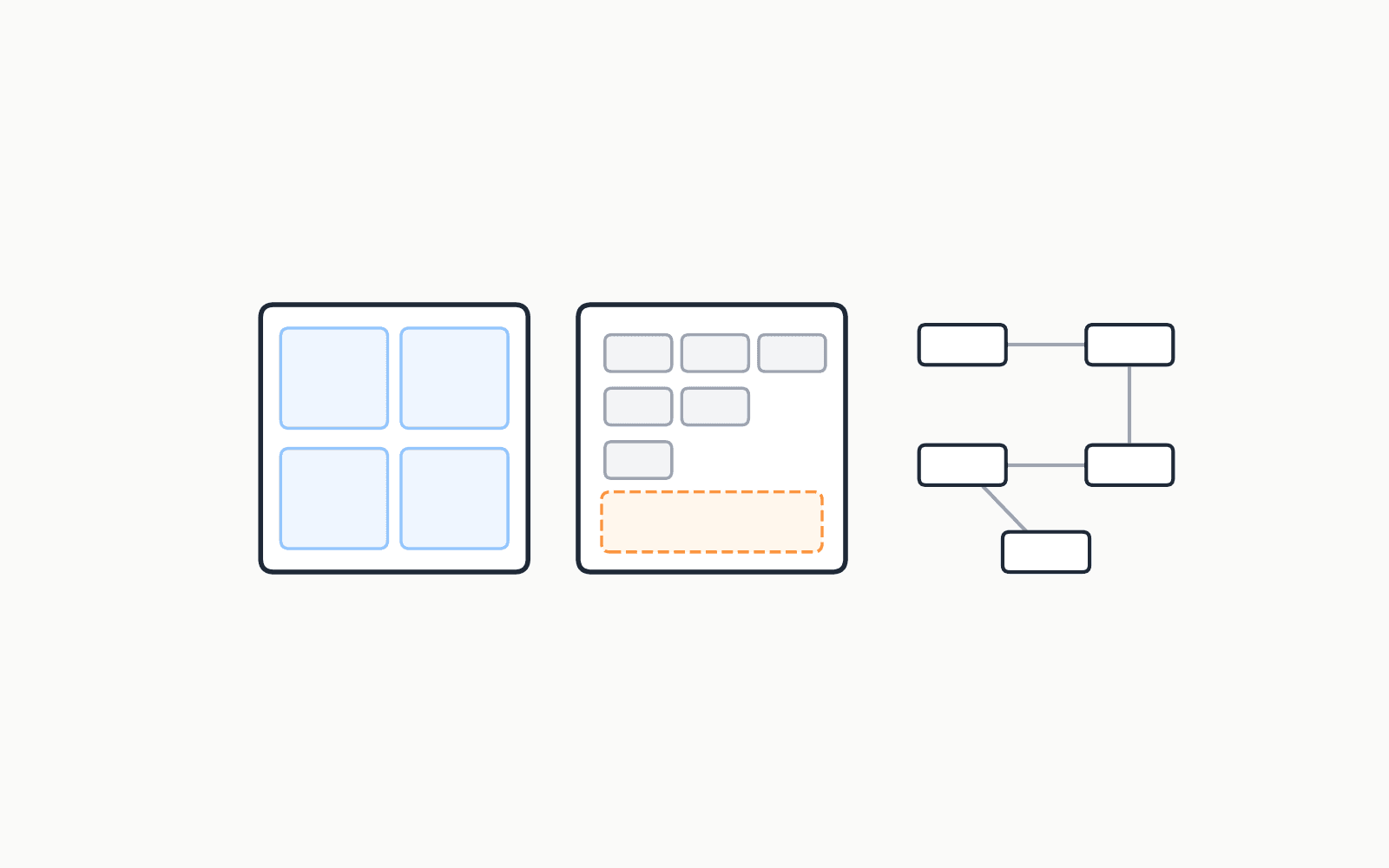
Recently I've been designing an asset system, and for a while our discussions kept going in circles. Every proposal looked reasonable on its own. Every proposal also broke someone else's use case.
Eventually I realized why. There are at least two fundamentally different kinds of assets: marketplace assets and production (pipeline) assets. We kept designing one while talking about the other.
Both are shareable. That's not the difference. The difference is who the box is designed for: the end customer, or the pipeline.
There is no best design for both. Even within production, there is no universal best, only the best for a concrete case.
Terminology First
Two words caused most of our confusion, because each of them meant two things.
Reference
- A DCC reference (Maya, USD): opening one file triggers loading other files.
- A file system link: a path that points to another location on disk.
Asset
- An asset in production: a living thing that changes as it moves between departments.
- An asset as a completed object: a finished package that someone consumes.
When one person says "asset" and means the first, and another person hears the second, you can argue for an hour without noticing.
An Asset Is a Bento
Think about a Taiwanese bento and a Japanese bento. It's hard to please a Japanese customer by handing them a Taiwanese fried chicken leg bento. And a Taiwanese customer won't accept a cold box that calls itself a bento.
An asset is like a bento: a box that holds food. Both are deliverables. And the design logic runs in one direction:
what the customer wants → what the box should hold → where the dividers go → what goes in each compartment
How a bento box is divided depends on what is variable. In our world, a variable might be format, DCC, department, character, or version. In the end, they're all just folders. What matters is where you put the dividers.
A bento should have clear dividers. Nobody likes a messy bento. But you can put the same food into different boxes for different customers.
The Bento vs. the Bento Factory
Here's the step back that unstuck me: a ready-to-eat bento and a running bento factory are different things.
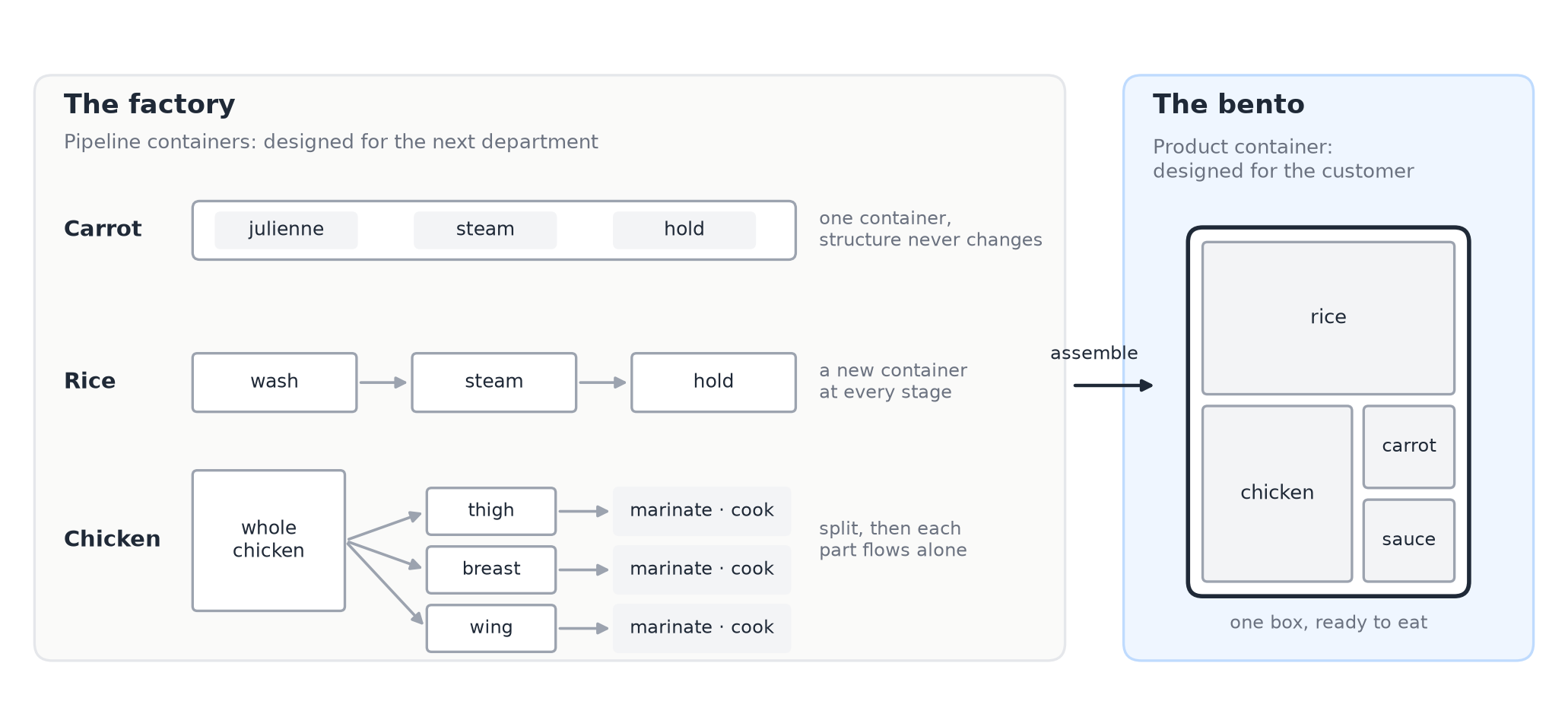
A ready-to-eat bento is designed around what pleases the customer most.
A factory is different. During production there are containers holding ingredients between departments. Some are simple, some are structured:
- Carrot stays in one container all the way through: julienned, steamed, held. The structure never changes.
- Rice goes into a washing container, then a steaming container, then a holding container. A new container at every stage.
- Chicken starts in one large bin, gets split into separate part containers, and each part is marinated and cooked on its own.
Only at the end does everything get assembled into a ready-to-eat bento.
They all look like boxes, but they play completely different roles. A pipeline asset is the factory container. A product asset is the bento. They're functionally different, and they should be designed separately.
This is where we got stuck. We were trying to decide what our bento should look like and design the factory's container system at the same time.
Three Patterns
Once I started looking at asset structures with this lens, every system I'd worked with fell into one of three patterns.
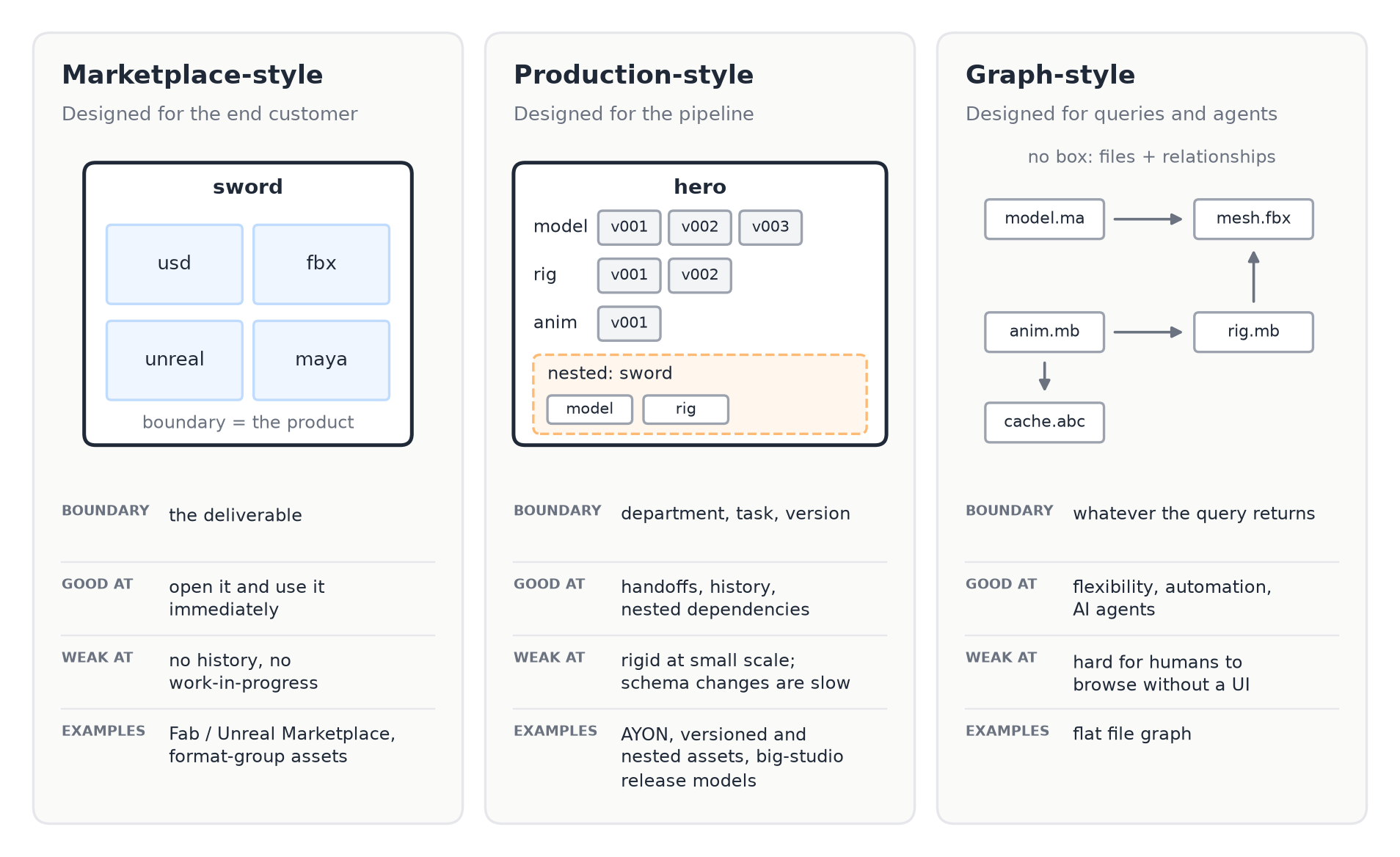
The structures below are simplified sketches, not exact schemas.
Marketplace-style: designed for the customer
Simple asset. The bare minimum.
{
    "name": str,         # "sword"
    "type": str,         # character, prop, motion...
    "files": List[str]
}
Format-group asset. The same idea, but with strict, predefined format keys. Every key must exist, even if it's empty.
{
    "name": str,
    "type": str,
    "formats": {
        "usd": List[str],
        "fbx": List[str],
        "unreal": List[str],
        "maya": List[str]
    }
}
Unreal Marketplace (Fab). Format-first, built so a customer can open it and use it immediately.
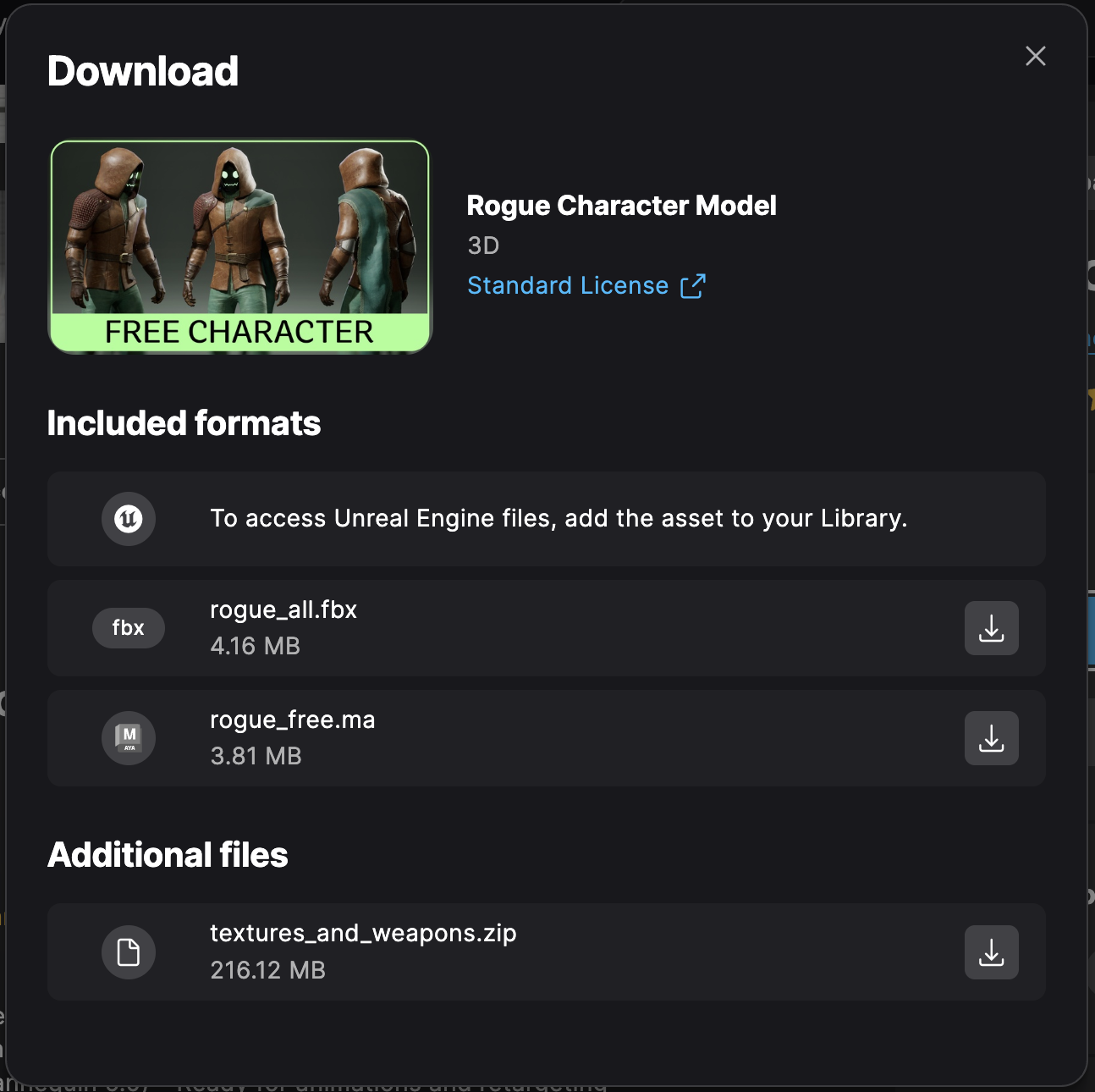
{
    "name": str,
    "type": str,             # "/3d-model/characters-creatures"
    "formats": ["unreal", "unity", "blender", "maya", "gltf"],
    "additional_files": List[str]   # e.g. textures.zip
}
Even here, if you download manually, you often have to relink textures. Marketplace assets optimize for the customer, but they're not magic.
Production-style: designed for the pipeline
Versioned asset. You can tell this one evolved from a production team's division of labor: each department gets its own read-only task folder, with versions inside.
{
    "name": str,
    "type": str,
    "tasks": [
        {"name": "modeling",  "versions": [{"name": "v001", "files": [...]}, ...]},
        {"name": "rigging",   "versions": [...]},
        {"name": "animation", "versions": [...]}
    ]
}
Nested asset. In a real production, nested assets are a must. A character carries a sword, and the sword is an asset too.
{
    "name": "hero",
    "type": "character",
    "folders": ["Model", "FBX", "Rig", "Texture"],
    "children": [
        {
            "name": "sword",
            "type": "prop",
            "folders": ["FBX", "Rig", "Texture"]
        }
    ]
}
AYON. AYON separates work files (what artists are iterating on) from publish files (what other departments are allowed to consume).
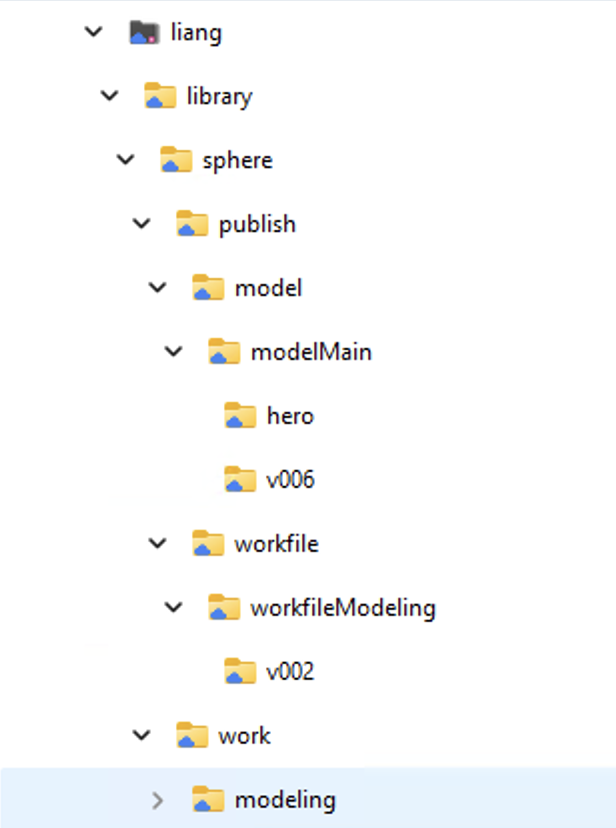
{
    "name": "sphere",
    "publish": [
        {"product_type": "model",    "versions": ["hero", "v006", ...]},
        {"product_type": "workfile", "versions": ["v002", ...]}
    ],
    "work": [
        {"task": "modeling", "files": [...]},
        {"task": "rigging",  "files": [...]}
    ]
}
A large VFX studio's release model. At the large studios I've seen, the asset system doesn't track work files at all. Artists work in their own DCC folders. What the system tracks is releases: published, read-only versions, each placed in a context such as project, scene, and shot.
project/
  library/              # shared assets: characters, environments
  sc010/
    sh0010/
      releases/         # published, read-only
        animated_character/
          sh0010_hero/
            v001/
      maya/             # DCC workspaces, per artist
        artist_a/
        artist_b/
What makes this model interesting is that every asset type has its own schema, defined in code:
class Asset:
    name: str
    type: str

class Character(Asset):
    model_file: str
    cache: str

class AnimatedCharacter(Asset):
    character: Character      # a link to another asset's version
    anim_cache: str
    maya_file: str

# Resolving an asset (pseudo-code):
release = find_asset(context="proj/sc010/sh0010",
                     name="hero",
                     type="AnimatedCharacter").latest()
release.character    # -> another release
release.maya_file    # -> a path on shared storage
My first design assumed every asset shares the same generic fields. The big-studio model does the opposite: an animated character and a camera package simply don't have the same fields, so each type gets its own.
That's a double-edged sword:
- Pro: everything looks exactly as expected. You get validation, autocomplete, and predictability.
- Con: every new request means changing the schema in a central codebase. Until that happens, teams work around it.
Also worth saying: these big-studio structures are optimized for scale and a strict division of labor. They're not necessarily the right fit for a smaller or faster-moving team.
Graph-style: no box at all
This is a different paradigm entirely. It doesn't define what an asset is. It tracks which files exist and how they relate to each other.
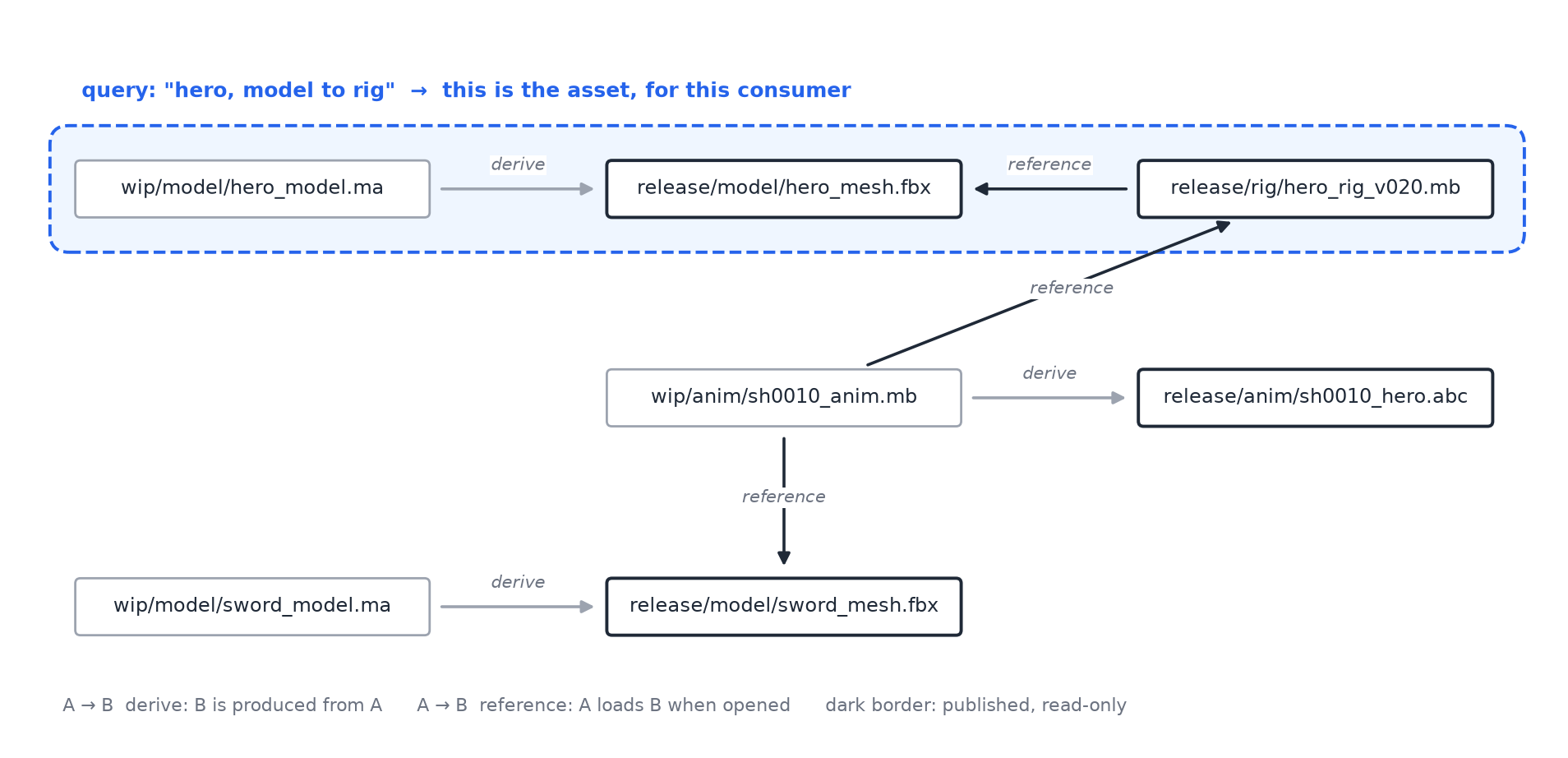
{
    "project": "proj",
    "files": List[str],
    "relationships": [
        {"from": "wip/model/hero_model.ma",
         "to":   "release/model/hero_mesh.fbx",
         "type": "derive"},
        {"from": "wip/anim/sh0010_anim.mb",
         "to":   "release/rig/hero_rig_v020.mb",
         "type": "reference"}
    ]
}
Asset boundaries become implicit. They're derived from the graph. The consumer defines the query, not the producer.
That makes it a good fit for agents and automated pipelines. It's not a good fit for humans navigating a folder structure, at least not without a good UI on top.
The Square Watermelon
The deepest question in all of this is: do you grow first and define later, or define the frame first and fill it in?
If you put a watermelon in a square mold while it grows, you get a square watermelon. It fits the shelf perfectly, but only if you picked the right shape before it grew. If the shelf changes, the watermelon doesn't.
Big-studio structures define the frame first. That works at scale. In a smaller or faster-moving context, it fails more often. The downside of defining first is that there will always be cases that don't fit. The only question is whether you'll run into them.
Where I Landed
So instead of designing one container to serve both worlds, I now ask the questions in order.
1. Which one am I designing right now: the pipeline (work in progress) or the deliverable (product)?
We can do both, but one of them has to be the primary constraint. Trying to solve both with a single layout is exactly what produces complicated, fragile folder structures.
2. If it's the deliverable: who is the customer?
Delivery requirements are relatively stable. They don't change every day with each artist's setup, so here it's fine to fix the keys.
- Game engines: the Unreal Marketplace is a good reference.
- VFX pipelines: expect references, versions, and modularity. This needs more research.
- AI agents: flat, schema-free paths accessed programmatically may be enough.
3. If it's the pipeline: how dynamic is the workflow?
That decides between strict keys and free folders.
In practice, my current baseline is simple. Use AYON to control how outputs are structured and named, so the data coming out of production is predictable. Then don't sync everything in real time. Run a lightweight sync only when a project is marked done, and assemble the results into the bento. Production stays fast, and the release library stays clean.
Where to Draw the Line
The more I think about this, the more it resembles the monolith vs. microservices debate. The split isn't about size. It's about what needs to change independently.
And the simplest divider of all is the file path. Everything else, whether type, version, task, or format, is metadata layered on top. Before adding a richer structure, it's worth asking whether we actually need it, or whether we just inherited it.
This is also why I keep coming back to the question I raised in End-to-End vs. Hybrid AI Video Pipelines: how much structure should sit between the idea and the final output, and who is that structure for?